A two-court tournament schedule with rest, worked through
8 teams, every team playing every other once: that is 28 matches. This page shows how they fit on one, two or three courts with a rest between each team's matches and a referee for every game, using the real schedule the free tournament schedule maker produces, and what the warnings it can show actually mean.
How many courts do 8 teams need?
Same 8 teams and 28 matches, starting at 09:00 with 20-minute matches and 5 minutes to change over. These are the numbers the tool gives for each choice:
| Courts | Rest asked for | Time slots | Last match ends | Matches with less rest than asked | Matches with no referee |
|---|---|---|---|---|---|
| 1 | none | 28 | 20:35 | 0 | 0 |
| 1 | 1 slot | 28 | 20:35 | 0 | 0 |
| 2 | none | 14 | 14:45 | 0 | 0 |
| 2 | 1 slot | 14 | 14:45 | 4 | 0 |
| 3 | none | 10 | 13:05 | 0 | 9 |
| 3 | 1 slot | 16 | 15:35 | 3 | 3 |
What this shows: more courts finish earlier, but with only 8 teams there are not enough other teams to rest and to referee at the same time. The choices with no shortfall at all are 1 court with no rest, 1 court with 1 slot of rest and 2 courts with no rest. One court with a rest of 1 takes until 20:35. For 8 teams in one day, two courts is the practical choice: with no rest asked for it ends at 14:45 with no shortfalls, and asking for a rest of 1, as in the schedule below, ends at 14:45 but leaves 4 matches short of rest.
The two-court schedule
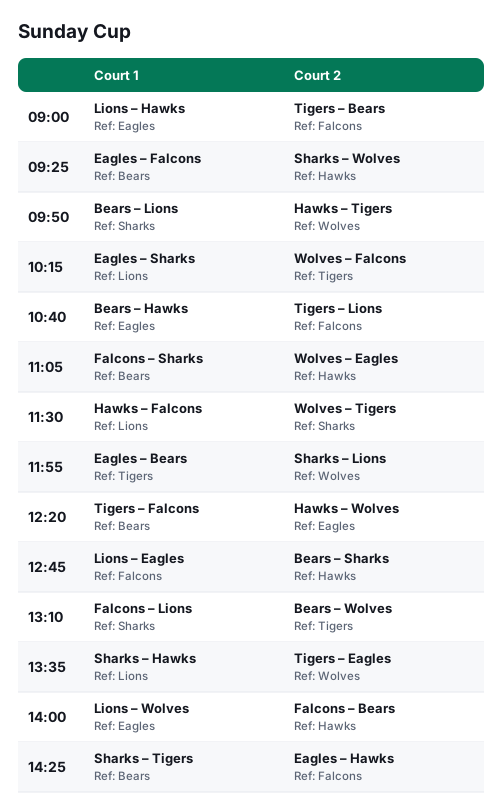
| Time | Court 1 | Court 2 | Played straight after their last match |
|---|---|---|---|
| 09:00 | — | Lions – Hawks (ref Eagles) | — |
| 09:25 | — | Eagles – Falcons (ref Bears) | — |
| 09:50 | — | Bears – Lions (ref Sharks) | — |
| 10:15 | — | Eagles – Sharks (ref Lions) | — |
| 10:40 | — | Bears – Hawks (ref Eagles) | — |
| 11:05 | — | Falcons – Sharks (ref Bears) | — |
| 11:30 | — | Hawks – Falcons (ref Lions) | Falcons, Wolves |
| 11:55 | — | Eagles – Bears (ref Tigers) | — |
| 12:20 | — | Tigers – Falcons (ref Bears) | — |
| 12:45 | — | Lions – Eagles (ref Falcons) | — |
| 13:10 | — | Falcons – Lions (ref Sharks) | Lions, Bears |
| 13:35 | — | Sharks – Hawks (ref Lions) | — |
| 14:00 | — | Lions – Wolves (ref Eagles) | — |
| 14:25 | — | Sharks – Tigers (ref Bears) | — |
Reading the warning
A rest of 1 was asked for, and in this schedule 4 matches come sooner after a team's last match than that (the right-hand column shows which teams: Falcons at 11:30, Wolves at 11:30, Lions at 13:10, Bears at 13:10). The tool shows this as a yellow note above the schedule. Nobody has to play twice at the same time, and every match has a referee (none were left without one).
To remove the short rests you can: ask for no rest if short breaks are fine; make the day longer or play on one court; or split the teams into two groups so fewer matches are needed.
Make yours
- Type your teams (or choose “my own matches” and type who plays whom).
- Set the number of courts, the start time, the match length and the changeover.
- Set how much rest teams should get, and who referees: other teams, or a list of people.
- Copy it for WhatsApp, save a picture, download a spreadsheet or print it. The link you share holds your settings, so the page opens just as you left it.
Questions
- What does “rest” mean in the tool?
- The number of match slots a team sits out between two of its own matches. One slot is 25 minutes here (20 for the match and 5 to change over), so a rest of 1 means no team plays two matches in a row.
- Who referees?
- A team that is not playing at that time, shared out so each team does about the same number. If every team is playing, the match has no referee and the tool says so; you can give it a list of people to referee instead.
- Why does the tool sometimes say “comes sooner than you asked”?
- It always places every match. When there are not enough other matches to put in between, it keeps the rest as long as it can and tells you how many matches fell short, so you can add time or a court, or accept it.
- Can I use my own list of matches?
- Yes. Choose “my own matches” and type lines such as “Lions vs Tigers”. The same rules about courts, rest and referees apply.
- How long should a match and the changeover be?
- Whatever your venue needs: the tool takes the match length and the changeover separately, and works out the start time of every slot.
The tools used here
- Multi-court tournament schedule makerPut every match on a court and a time, with rest between games and a referee for each match, for a whole tournament day.
- Fixture list generatorTurn a list of teams into a fair league schedule with dates — export to Excel.
- Fair rota makerA fair duty rota for referees, volunteers or shifts — everyone gets their share, with unavailable days respected.