Plan a school sports day, step by step
A sports day is mostly lists: who is in which house, which race is when, which teacher does what, and who is winning. This page follows one made-up school (4 houses, 6 events) from the house draw to the final points, with the real output of the free tools at each step. Everything runs in your browser, so pupils' names stay on your device.
The plan at a glance
| When | Job | Tool |
|---|---|---|
| Weeks before | Split the pupils into houses | Team picker |
| Two weeks before | Timetable the races | Tournament schedule maker |
| One week before | Rota the teachers and helpers | Fair rota maker |
| Day before | Print registers and any raffle tickets | Attendance register, Raffle ticket maker |
| On the day | Keep the house points | Quiz scorekeeper |
| After | Share the result | Copy as text, save a picture, or share a link |
1. Draw the houses
Paste the class lists into the team picker and ask for 4 teams: it splits the names into even, random houses, and a fair shuffle means every pupil has the same chance of each house. Type each house name (here Red House, Blue House, Green House and Yellow House) and copy the lists to send to teachers. Do this once, early, and keep the lists: they are the only input the rest of the plan needs.
2. Timetable the races
A relay league where every house races every other house once is 6 races. With two tracks, a 10:00 start, 10-minute races and 5 minutes to change over, that is 3 time slots, finishing at 10:40. Two teachers judge, one on each track (Mr Khan and Ms Ali), so every race has a judge. Nobody is asked to rest because all 4 houses race in every slot.
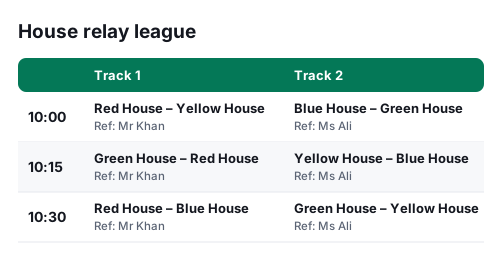
| Time | Track 1 | Track 2 |
|---|---|---|
| 10:00 | — | Red House – Yellow House (judge Mr Khan) |
| 10:15 | — | Green House – Red House (judge Mr Khan) |
| 10:30 | — | Red House – Blue House (judge Mr Khan) |
3. Rota the helpers
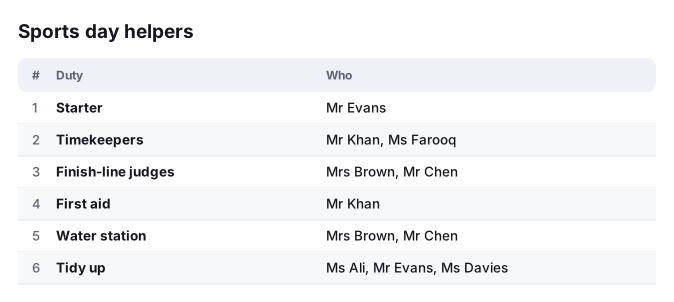
6 jobs need 11 places, shared out among 7 teachers so that no one does a lot more than the others. In the fair rota maker you can also mark who cannot do which job, and send the finished rota as a picture.
4. Print what you need the day before
- A register for each house or class from the attendance register, so teachers can tick who has arrived.
- Numbered raffle tickets for a fundraiser from the raffle ticket maker (see them on the printable sheets page).
- The relay timetable and the helpers' rota from the steps above, as pictures or on paper.
5. Keep the house points on the day
After each event, type the points for each house. Here 5, 3, 2, 1 points go to 1st, 2nd, 3rd and 4th, so each of the 6 events hands out 11 points and 66 are awarded in total.
| Event | 1st (5 points) | 2nd (3 points) | 3rd (2 points) | 4th (1 points) |
|---|---|---|---|---|
| 100 m sprint | Blue House | Red House | Green House | Yellow House |
| Relay | Red House | Blue House | Yellow House | Green House |
| Long jump | Green House | Yellow House | Blue House | Red House |
| Egg and spoon | Yellow House | Green House | Red House | Blue House |
| Tug of war | Red House | Green House | Blue House | Yellow House |
| Sack race | Blue House | Red House | Yellow House | Green House |
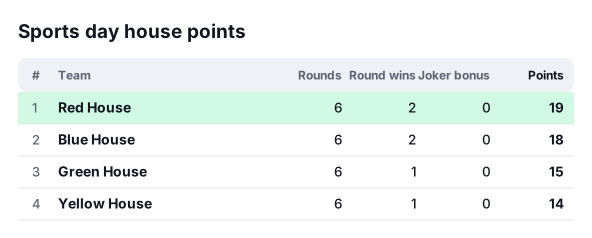
Red House finish first with 19 points, just ahead of Blue House on 18: one point decided it, and the board re-ranks the houses as you type, so there is no adding up at the end. The scorekeeper calls the houses “teams” and the events “rounds”.
6. Share the result
Copy the standings as text for a WhatsApp group or the newsletter, save the picture for the notice board, or make a link that opens the same board for anyone. The link holds the scores in its address, so nothing is stored on a server.
Questions
- How many points should each place get?
- This example gives 5, 3, 2, 1 points for 1st to 4th in every event, so each event hands out 11 points. You decide the numbers: you type the points for each house and event, and the board adds them up.
- What if two houses finish on the same points?
- They share a rank, shown with an equals sign (for example =2), and the tie stays visible until you decide how to break it.
- Can I show the points on a big screen?
- Yes. The board has a big-screen view for a projector or a laptop on the side of the field.
- Do I need a different tool for the points?
- The points board here is the quiz scorekeeper, which already ranks teams across rounds. It says “teams” and “rounds” where a school says “houses” and “events”; read them that way. The “Joker bonus” column stays at 0 unless you switch jokers on.
- Where are the pupils' names stored?
- Nowhere but your own device. Nothing is sent to a server, and a tool remembers your last list only on that device so you do not retype it.
The tools used here
- Team picker & group drawSplit people into fair random teams, run a World Cup-style group draw, make random matchups or pick a winner.
- Multi-court tournament schedule makerPut every match on a court and a time, with rest between games and a referee for each match, for a whole tournament day.
- Fair rota makerA fair duty rota for referees, volunteers or shifts — everyone gets their share, with unavailable days respected.
- Quiz scorekeeperScore a school, family or club quiz: teams, rounds, an optional joker, a live leaderboard for the big screen.
- Attendance registerPrint a monthly attendance register: your class or group names, a column for every day, days off shaded, totals at the end.
- Raffle ticket makerPrint numbered raffle tickets with a tear-off stub: your raffle name, prize, price and date, eight tickets to an A4 page.